





Pago de Facturas
Bill Pay makes managing your payments easy
Schedule payments, manage payees, and stay on top of your finances with Bill Pay.
Características
Bill Pay includes several features to enhance your bill paying experience
Clear view of scheduled payments
Vea rápidamente todos los pagos y montos próximos de un vistazo.
Acceso desde más cuentas
Pague facturas desde cualquier cuenta corriente asociada a su Número de Seguro Social.
Diseño moderno e intuitivo
Enjoy clean navigation and a user-friendly layout.
Configuración simplificada del beneficiario
Add new payees fast and with only a few steps.
Seguimiento de pagos
Seguimiento de pagos enviados por correo a través del sistema postal.
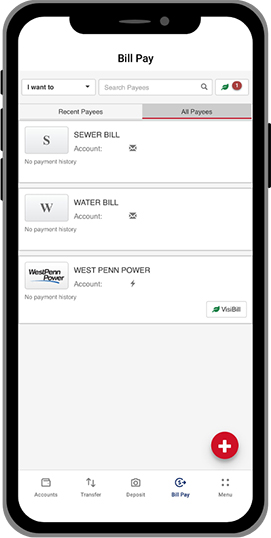
Echa un vistazo
Look at the Bill Pay experience below for a sneak peek.
Preguntas Frecuentes
VisiBill facilita la consulta y el pago de sus facturas en línea, conectando a sus facturadores directamente con el sistema de pago. Muchas de las principales compañías de tarjetas de crédito, financieras de automóviles y otras pueden configurar VisiBill. Esta función se conocía como facturas electrónicas en nuestra plataforma anterior.
Aún puedes pagarlos a través de Pago de Facturas. Si conoces el importe, puedes configurar un pago mensual recurrente sin tener que revisarlo cada mes. Deberás contactar a la compañía para que te envíen la factura por otro medio.
Sí. Se espera que se incorporen más proveedores, incluido Comcast, en 2026.
Para pagos únicos, se verifica la disponibilidad de fondos en la fecha programada. Para pagos recurrentes, se verifica la disponibilidad de fondos en cada fecha programada. Los pagos no se procesarán si no hay fondos suficientes.
La hora límite diaria es 3:00 p.m.. Los pagos realizados antes de las 15:00 se procesarán el mismo día. Los pagos realizados después de las 15:00 se procesarán el siguiente día hábil.
Los pagos ACH se identifican con un icono de rayo, mientras que los pagos con cheque se identifican con un icono de sobre. Esta información es visible en varias áreas, incluyendo Pagos programados y Pagos recientes.
El nombre del beneficiario aparecerá en su estado de cuenta. Para garantizar que los pagos se contabilicen de la forma más rápida y segura posible, es posible que en ocasiones se procesen a través de redes seguras, y es posible que vea números de tarjeta desconocidos en las comunicaciones relacionadas.
El nombre del beneficiario no se puede cambiar; sin embargo, toda la demás información del beneficiario se puede editar.
Tanto para pagos únicos como recurrentes, se pueden editar todos los detalles excepto el nombre del beneficiario siempre que el pago esté programado para una fecha futura.
Sí. Pago de Facturas ofrece opciones para imprimir y exportar datos de pago. Los datos se pueden filtrar por fecha o por beneficiario.
Los pagos programados para fechas futuras se pueden cancelar accediendo a Pagos programados o Editar pagos y haciendo clic en el icono de la papelera. Para pagos recurrentes, se le pedirá que elija Eliminar esta ocurrencia o Eliminar el horario completo.
Dentro del menú Pago de facturas, seleccione Actualizar mis preferencias Para configurar notificaciones por correo electrónico para:
- Resumen de pagos diarios
- Cuando se crea o edita un beneficiario
- Pagos que exceden un monto en dólares que usted define
Seis meses de historial de pagos estarán disponibles en 1/12/2026. De ahora en adelante, tendrás acceso a hasta 7 años del historial de pagos.
Divulgaciones
-
Asegurado por la NCUA
-
Prestamista de vivienda equitativa