





Bill Pay
Bill Pay makes managing your payments easy
Schedule payments, manage payees, and stay on top of your finances with Bill Pay.
Features
Bill Pay includes several features to enhance your bill paying experience
Clear view of scheduled payments
Quickly see all upcoming payments and amounts at a glance.
Access from more accounts
Pay bills from any checking account associated with your Social Security Number.
Modern, intuitive design
Enjoy clean navigation and a user-friendly layout.
Streamlined payee setup
Add new payees fast and with only a few steps.
Payment tracking
Track mailed payments through the postal system.
Take a Look
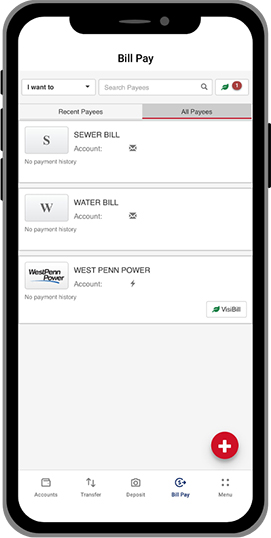
Look at the Bill Pay experience below for a sneak peek.
FAQs
VisiBill makes it easy to view and pay your bills online by connecting your billers directly to the bill pay system. Many major credit card companies, automotive finance companies, and more can be set up for VisiBill. This feature was referred to as e-Bills in our previous platform.
You can still pay them through Bill Pay. If you know the amount, you can set up a recurring monthly payment without having to revisit each month. You will need to contact the company to have your bill sent another way.
Yes. Additional vendors—including Comcast—are expected to be added in 2026.
For one-time payments, available funds are checked on the date the payment is scheduled to be made. For recurring payments, funds are checked on each scheduled payment date. Payments will not be processed if sufficient funds are not available.
The daily cutoff time is 3:00 PM. Payments created prior to 3:00 PM will be processed the same day. Payments created after 3:00 PM will be processed the next business day.
ACH payments are identified by a lightning bolt icon, while check payments are identified by an envelope icon. This information is visible in several areas, including Scheduled Payments and Recent Payments.
The payee’s name will appear on your statement. To ensure payments are posted as quickly and securely as possible, payments may sometimes be processed through secure networks, and you may occasionally see unfamiliar card numbers in related communications.
The payee name cannot be changed; however, all other payee information can be edited.
For both one-time and recurring payments, any details other than the payee name can be edited as long as the payment is scheduled for a future date.
Yes. Bill Pay provides options to print and export payment data. Data can be filtered by date and/or by payee.
Payments scheduled for future dates can be canceled by accessing Scheduled Payments or Edit Payments and clicking the trash can icon. For recurring payments, you will be prompted to choose either Delete this occurrence or Delete entire schedule.
Within the Bill Pay menu, select Update My Preferences to set up email notifications for:
- Summary of daily payments
- When a payee is created or edited
- Payments that exceed a dollar amount you define
Six months of payment history will be available on 1/12/2026. Moving forward, you will have access to up to 7 years of payment history.
Questions?
Disclosures
-
Insured by NCUA
-
Equal Housing Lender